Default Course Information
The aPay Training & Development module requires default course information be established for any course regardless of how many times it is being conducted.
It is not unusual to run the same training course more than once to allow all staff to attend, or to run the same training course at a later date to train newcomers to the organisation. The course is going to have elements that are the same regardless of the date it is held. Examples of elements that may be the same are the number of days for the course, total hours, originator and costs.
Once the default course information is established the information is used by the system to allow a date or many dates to be attached to the course code. Each different date allocated to the course code requires a different course number.
The default information becomes a template for each of the course numbers. The system allows any aspect of the default information (except the Course Code) to be changed at the time of allocating the dates and course numbers.
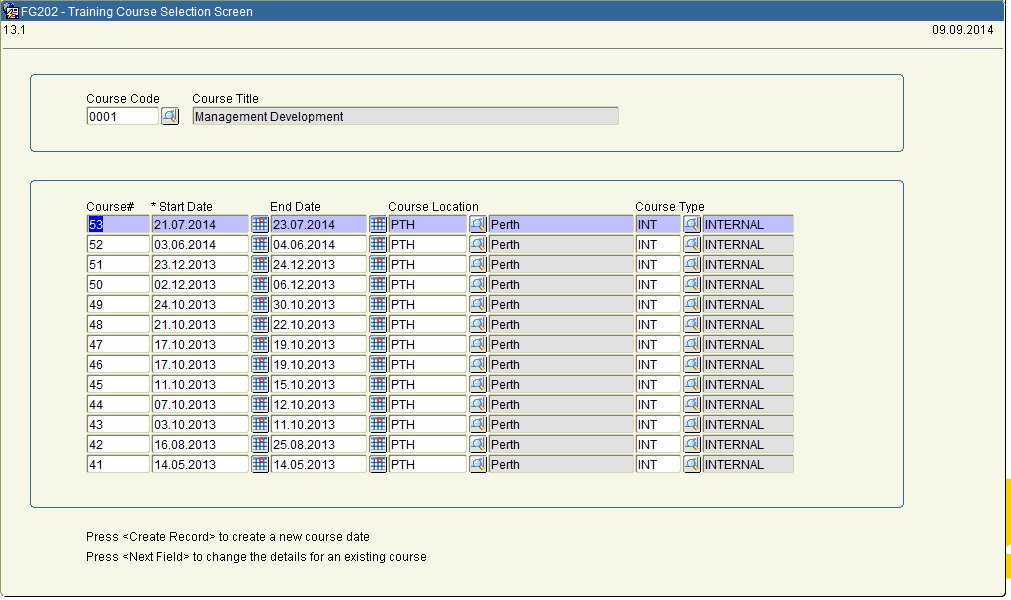
Set out below, is an illustration of the same course being conducted on numerous dates.
In the above example, the default information for ‘0001’ will display in the form FC799 - Training Course Details.
The course code cannot be changed. Any of the other data that has defaulted into the form can be overridden if necessary. (Refer to next section for further information regarding allocating numbers and dates to courses.)
The Con_Def TRAIN_DEFAULT_REQ determines whether the Default Training Course Information is mandatory or not.
The FC798 - Default Training Course tab form allows navigation between the screens by clicking on the ‘tabs’ at the top of the screen.
Although users are able to freely move between screens within the form, a number of built in checks ensure that when adding in the course details, some vital data is saved prior to moving into other screens.
The tab form may be invoked in add/change or display mode depending on the ‘Launch’ mode defined for the program within FA005 - Menu Maintenance.
FC798 - Default Training Course is available on menu 0710.
All details entered are stored in the following tables after the form has been saved:
· train_course_default
· train_course_skill
· train_admin_default
· train_course_module
· default_instructor
· default_course_costs
· train_res_booked
· train_admin
· questionnaire_dist
· questionnaire_dist_recip
1. Go to Maintain Training Courses (0710).
2. Select Default Training Course Details.
3. FC798 - Default Training Course Details will appear. The first course code and its associated details will be displayed.
4. Select the applicable course, by either scrolling down on the course code or search using the query function.
5. FC798 - Default Training Course Detail is made up of 8 tabs they are as follows:
· Course Details
· Instructors
· Skills
· Checklists
· Modules
· Costs
· Evaluations
· Extra Details
6. To add a new record click on the insert icon or scroll down to a blank line.
7. If searching for a particular record the query function can be used to search any field for specific data.
8. All coded fields have lookup available. The lookup may be accessed by clicking on the list icon or by double-clicking in the relevant field. All data entered in a coded field will be validated against the codes table.
9. All mandatory fields must be entered and if you attempt to leave any mandatory fields blank, the error message ‘Field must be entered’ appears.
10. Once all modifications have been made or new records added save the form by clicking on the save icon